Digital vs Rotary Screen Printing: Which Suits Your Design?
Digital vs rotary screen printing comes down to three questions: how many metres you will print per design, how many colours the artwork carries, and how soon the fabric has to ship. Digital wins on short runs, tonal or photographic artwork, and lead time; rotary wins on long runs of flat-colour designs, deep blotches, and metallic or specialty pastes. The part most guides skip is that the design file decides more than the machine does, and a file built for the stricter process can run on both. This guide gives the break-even numbers, what each process demands from the artwork, and a workflow for preparing one design that prints correctly on either line.
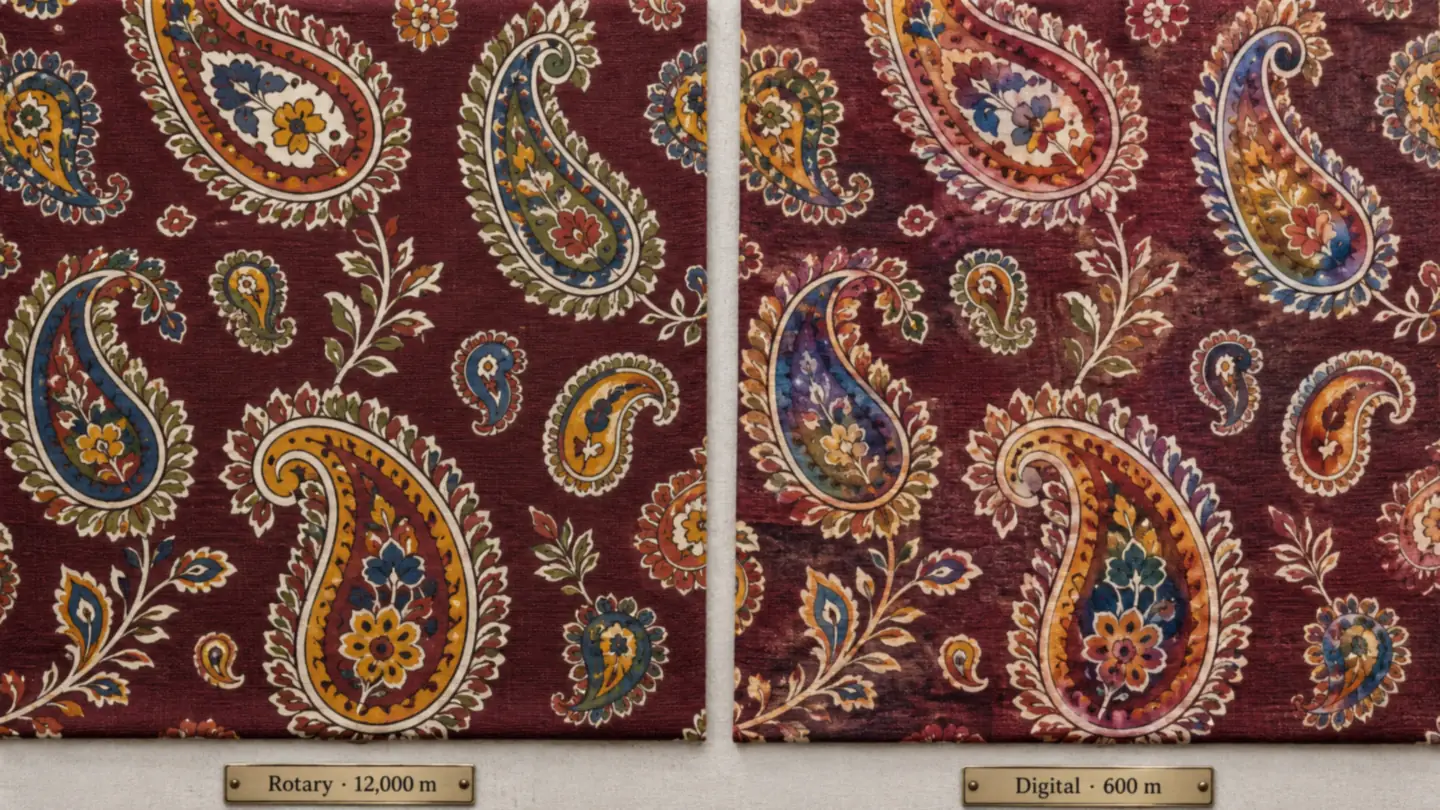
Digital vs Rotary Screen Printing: The Short Answer
Two benchmark figures anchor almost every serious comparison. A Gherzi cost study cited by SPGPrints finds digital printing more economical below roughly 1,200 metres per design, rotary more economical above roughly 3,000 metres, and a grey zone between 1,000 and 3,000 metres where the answer depends on the specific printer (SPGPrints). SPGPrints' own application guidance draws the lines wider, with digital cheaper under 2,000 metres, rotary cheaper above 5,000, and the middle band settled by colour count and the number of colourways (SPGPrints application guide).
The reason is the setup. Rotary needs colour separations, an engraved nickel screen for every colour, registration on the machine, and fabric consumed while the print settles, which is a fixed cost paid before the first sellable metre. Digital has almost no setup and a higher running cost per metre. One 2026 comparison puts rotary setup at 3 to 6 weeks including engraving, colour matching, and strike-off, against 15 to 30 minutes of file upload, RIP, and calibration for digital, with sustained rotary speeds of 80 to 100 metres per minute versus 35 to 75 for single-pass digital and 15 to 30 for scanning heads (iFactory).
| Factor | Rotary screen printing | Digital printing |
|---|---|---|
| Economical run length | Above ~3,000 m per design | Below ~1,200 m per design |
| Setup before first metre | Separations, screens, registration: weeks | File, RIP, calibration: under an hour |
| Colours per design | 8 to 24 screens, 12 to 16 typical | Effectively unlimited, gradients included |
| Repeat size | Must divide into screen circumference | Any size, including engineered panels |
| Speed | 80 to 100 m/min sustained | 15 to 75 m/min depending on head type |
| Solid blotches and metallics | Strong; gold, glitter, burn-out possible | Weak; no true metallic, large solids can band |
| Cost per screen or setup | Roughly $300 to $1,000 per screen | No screens; ink and profile cost per metre |
| Minimum order | Often 500 to 3,000 m | One metre with no penalty |
Screen cost is where the numbers spread. A US print consultancy lists cylindrical screens at 300 to 1,000 dollars each and notes that rotary still produces roughly 65 percent of textile prints worldwide (TVF), while other estimates run 50 to 200 dollars per screen with a six-colour design landing between 300 and 1,200 dollars plus engraving labour (iFactory). Indian engraving rates sit well below US quotes, but the structure is identical: every colour you add to a rotary design is a screen you pay for and a registration you can lose.
Why the Question Is Live in Surat Right Now
Digital vs rotary screen printing has become a margin decision this season. On August 27, 2026 the South Gujarat Textile Processors Association resolved to raise job charges by 15 percent, effective September 7, 2026, citing rising coal, dye, chemical, labour, and electricity costs (Loktej). Three days earlier, weaving associations reported that polyester yarn had climbed from Rs 112 to Rs 140 per kilo, a 25 to 30 percent rise the grey market absorbed at only Rs 1 to 1.50 per metre, prompting roughly 1.5 lakh powerlooms to cut shifts (Apparel Resources).
When processing costs rise and grey fabric margins shrink, traders answer by ordering smaller lots more often, which pushes more designs under the rotary break-even. That is happening inside a cluster of about 450 process houses producing close to 6 crore metres of fabric a day and holding roughly 65 percent of India's man-made fibre segment (Textiles Resources). Globally the digital textile printing market was valued at 9.3 billion dollars in 2025 and is projected to reach 24.2 billion by 2033 at 13 percent a year, with Asia Pacific the fastest-growing region (Grand View Research). None of that makes rotary obsolete; it makes the decision per design, rather than per factory, and that decision starts in the design file.
The machine question is really a file question. A job-work print house that can take one approved design and route it to digital for the 600-metre trial and to rotary for the 12,000-metre reorder, without redrawing, keeps both margins.
What Rotary Screen Printing Demands from a Design
The repeat must fit the screen
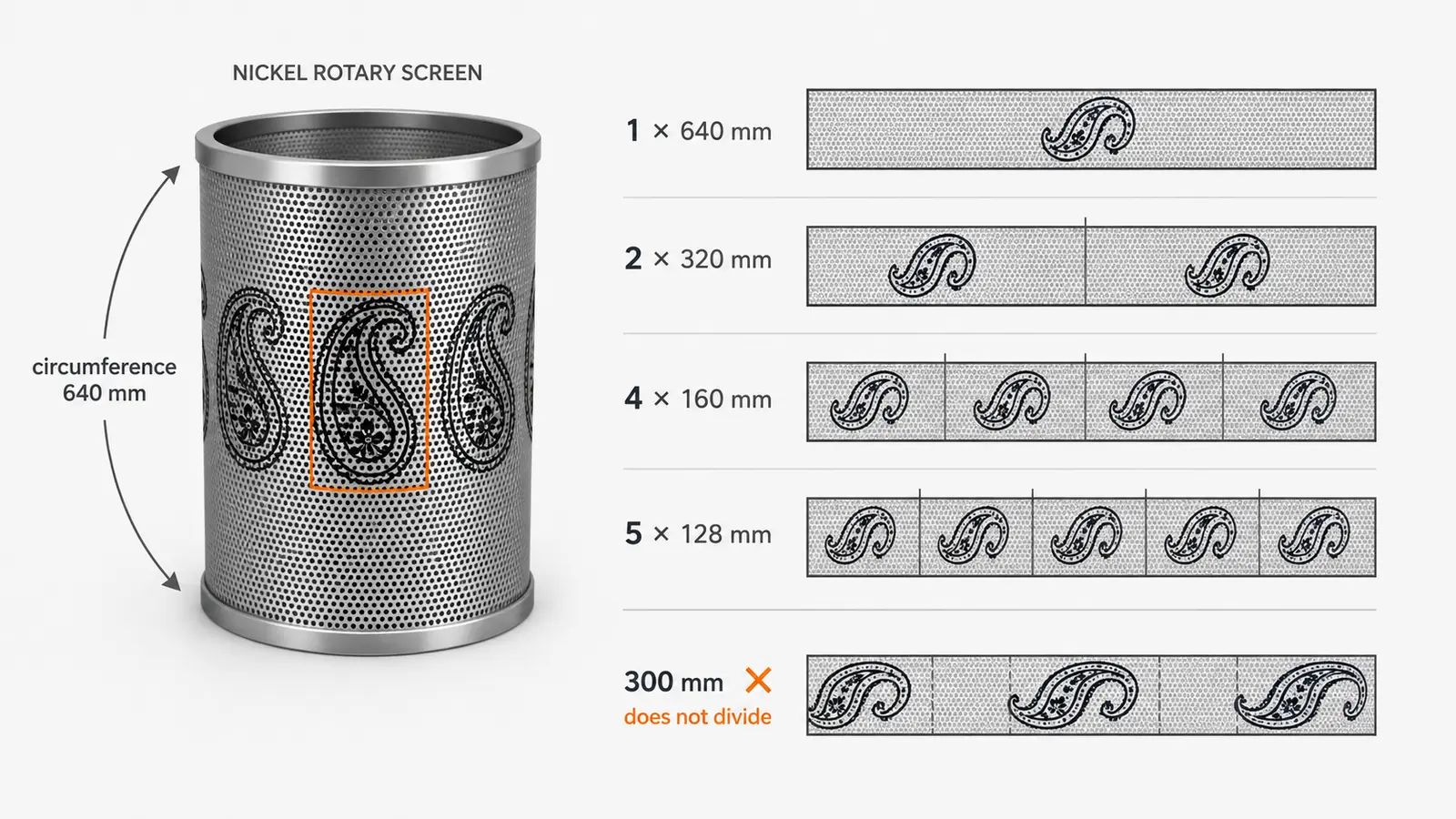
A rotary screen is a nickel cylinder, and the design wraps around it, so the vertical repeat has to divide evenly into the circumference. Standard screens are 640 mm, with larger 820 mm, 914 mm, and 1018 mm sizes available for bigger repeats (Roopa Screen, Ahmedabad). On a 640 mm screen that means a 640, 320, 160, or 128 mm repeat; anything else forces the engraver to stretch or crop the artwork. Confirm the circumference with the process house before the repeat is built, then build the repeat to that number. The seamless repeat guide covers block, half-drop, and brick structures; for rotary, the half-drop still has to land on the circumference after the drop.
Colours are screens, so count them like money
Every flat colour is a separate screen. Machines carry 8 to 24 stations, with 12 and 16 colour lines the common configuration, so a design that reaches the engraver with 40 colours from a scanned reference has to be reduced before anything else happens. Tonal work is possible through halftone screens, but it needs finer mesh: SPGPrints recommends 165 to 195 mesh for halftones to avoid moiré and visible dots, 135 mesh for flat blotches, and 125 mesh for general work (SPGPrints screen selection). In practice that means a soft watercolour floral is either flattened into 8 to 12 clean tones with trapping, or it goes digital.
Where rotary is unbeatable
Large uniform grounds, deep blotches, shiny gold and metallic pastes, glitter, and burn-out effects are rotary strengths that digital cannot reproduce, because digital uses water-based non-opaque inks that struggle with light colours on dark grounds and can show line-building in large solids (SPGPrints). A festive saree body in a solid maroon with gold butta belongs on rotary if the volume supports it.
What Digital Printing Demands from a Design
Resolution at fabric width, not on screen
Digital removes the screen and the colour limit, then hands the bill to the file. A design that looks sharp at 1,200 pixels wide on a laptop is blurred mush across 1.5 metres of fabric. The working rule is a print-ready file at the full printed width at 150 to 300 DPI depending on fabric and viewing distance; the print-ready upscaling guide walks through the DPI arithmetic for each fabric type. Digital forgives colour count and punishes resolution, which is the exact opposite of rotary.
Colour is a profile, not a paste
Rotary colour is mixed paste matched to a lab dip. Digital colour is built from a fixed ink set through a colour profile, so what reaches the fabric depends on the printer, ink, fabric pretreatment, and profile combination. Saturated oranges, deep navies, and anything metallic are the usual casualties. The practical answer is to reference every colour to a Pantone TCX code before the file leaves the studio, run a digital strike-off on the actual fabric, and treat the profile as something to correct rather than trust.
Where digital is unbeatable
Photographic prints, watercolour bleeds, long or engineered repeats, and designs with hundreds of colours are digital territory by default. So are sampling and colourways: printing 5 metres of each of six colourways before committing to bulk costs a few hundred rupees of ink and an afternoon, where the same exercise on rotary is six sets of screens. Digital also uses far less water, around 60 to 80 litres per kilo of fabric against about 200 litres for screen printing (Mordor Intelligence), which matters as effluent compliance tightens in processing clusters.
One Design, Two Lines: A Workflow That Fits Both
Here is the workflow as it runs on Textile Designer AI for a common case: a Surat trader wants a new paisley for the festive season, will trial it digitally on 600 metres across three colourways, and expects to reorder 12,000 metres on rotary if it sells. The file has to be built for rotary from day one so the reorder does not trigger a redraw.
Fix the repeat size before the artwork
Ask the process house for the screen circumference, usually 640 mm, and decide the physical repeat now, say 320 mm. Generate the base design with Design Generation; if you are starting from a buyer reference or a garment photo, Dress to Design flattens it first. Then run Repeat Set to build the block or half-drop tile and check it in the grid preview. The tool makes the tile seamless; the physical size is set when you export it, so a 320 mm repeat at 300 DPI is a tile 3,780 pixels tall. Hold that pixel size and the same tile prints on the rotary screen and the digital line without adjustment.
Reduce colours to a screen count
Set a colour budget from the machine, say 12. Use Color Separation to split the design into flat spot-colour layers and see how many screens the artwork really needs. If the AI produces 18 layers, merge near-duplicate tones and simplify gradients until the count fits; that step is what makes the design rotary-capable. The colour separation guide covers trapping and the common failure points.
Reference every colour to Pantone TCX
Run the separated layers through Color Matching so each screen colour and each digital ink target carries a Pantone TCX reference. Treat the code as a starting point and confirm it against the physical TCX swatch before it goes on the recipe sheet. The dye house mixing rotary paste and the digital operator building the profile then aim at the same confirmed target, which is what keeps the reorder matching the trial.
Build colourways from the separated file
Generate the three trial colourways with Color Transfer applied to the separated layers, not the flat image. Because each layer is already one screen, a colourway is a paste recipe change on rotary and a palette swap on digital, with no new artwork in either case.
Upscale for the digital trial
Take the approved colourways to full fabric width at print DPI with Super Scaler, or use Ready to Print when you want a one-click export at a target DPI. Rotary engravers work from the separated layers, so the upscale is only for the digital line, but it is the step people skip and then blame the printer for soft edges.
Hand each line its own file
The digital line gets the upscaled colourway file. The engraver gets the layered PSD from Color Separation, one layer per screen, with each layer named by its TCX reference and the repeat size in the file name. Approve one digital strike-off and one rotary strike-off against the same TCX references, then release.
Tip
A Decision Checklist for Print Houses and Traders
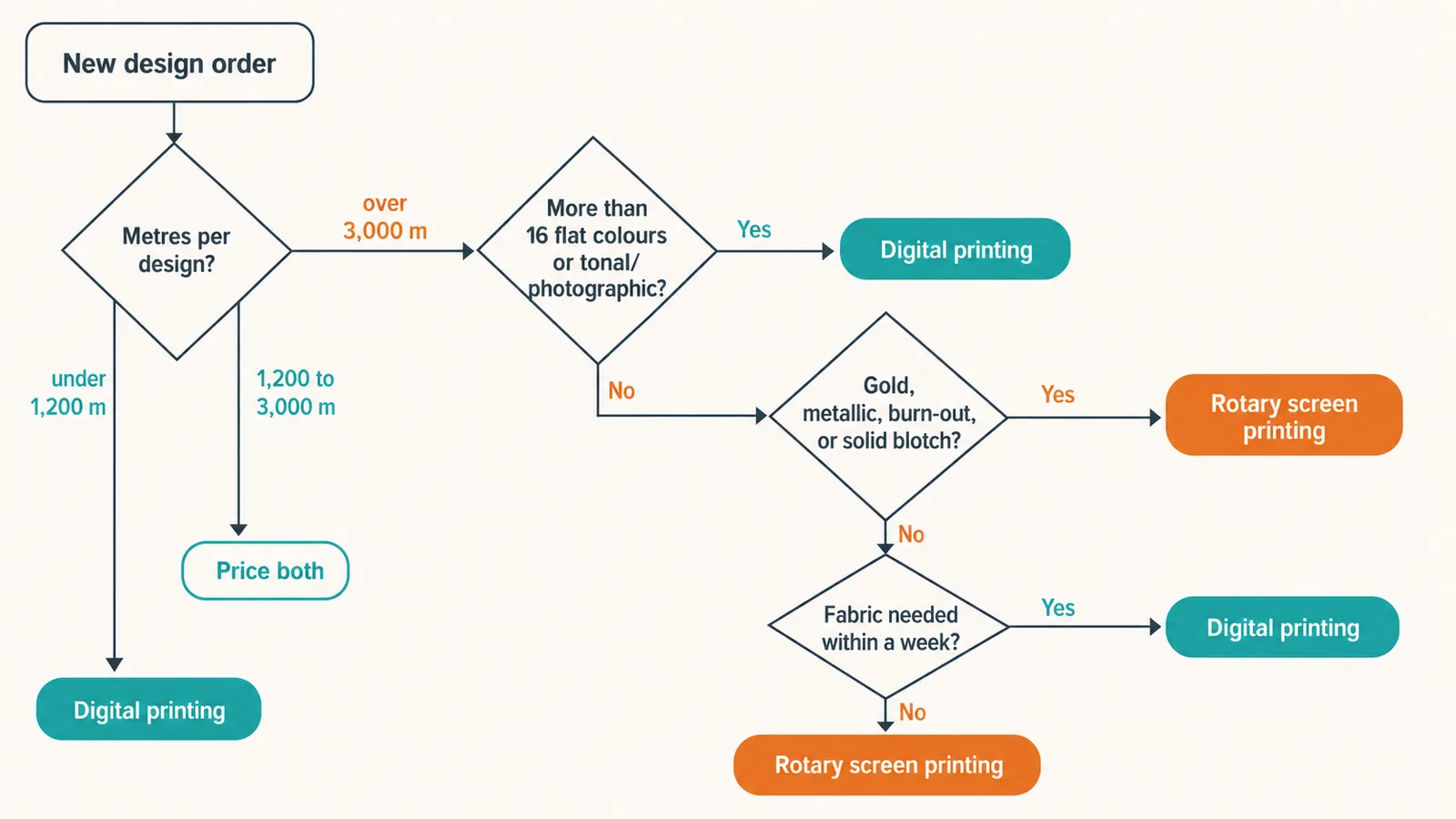
Settling digital vs rotary screen printing per design is faster with a fixed checklist. Route a design to digital when the run per design is under roughly 1,200 metres, the artwork is tonal or photographic, the buyer needs fabric inside a week, the repeat is engineered or longer than any screen you own, or you are sampling colourways before a bulk decision. Route it to rotary when the run per design exceeds roughly 3,000 metres, the palette is 16 flat colours or fewer, the design leans on solid blotches, gold, metallic, or burn-out effects, and the calendar allows three to six weeks for screens and strike-offs. In the band between, price both: on a 2,000-metre order of a 12-colour design, the twelve screens are often the whole difference, and a colour count cut to eight can move the answer.
Where AI Falls Short in the Digital vs Rotary Decision
Being clear about the limits is what keeps this workflow useful on a real floor.
- AI does not know your break-even. The 1,200 and 3,000 metre figures are industry benchmarks. Your number depends on your engraving rate, machine utilisation, and the job charge that just moved 15 percent. The costing stays with the owner and the accountant.
- Colour reduction is a design judgement. The separation tool will find 12 layers; deciding which two tones can merge without killing the motif is a designer's call, and a bad merge shows on 12,000 metres.
- Neither strike-off goes away. A TCX reference narrows the target; it does not replace a lab dip on rotary or a profile check on digital. Ink, paste, pretreatment, and fabric all shift colour in ways a screen cannot show.
- Engraving still needs an engraver. Separated layers are the input to engraving, not the output. Mesh selection, trapping tolerances, and squeegee settings remain shop-floor expertise.
Note
Who Gets the Most Out of This
- Job-work print houses running both lines. Quote digital and rotary on the same design from one file, and stop losing reorders to the three-week redraw.
- Traders testing festive designs. Trial on digital, reorder on rotary, and keep the colourways matching because both were built from one separated master.
- Exporters answering short-lead buyers. Send a digital strike-off within days while the rotary screens for the bulk are engraved in parallel, both referenced to the same TCX sheet.
- Design studios selling to mills. Deliver every design in a rotary-capable form, at a fixed repeat with a screen count, and it becomes sellable to twice as many buyers.
Frequently Asked Questions
At what run length does rotary screen printing become cheaper than digital?
The most cited benchmark, from a Gherzi study referenced by SPGPrints, puts digital ahead below roughly 1,200 metres per design and rotary ahead above roughly 3,000 metres, with the band in between depending on colour count and number of colourways. Every process house has its own break-even, because screen cost, machine utilisation, and job charges differ. Ask your printer for their number rather than trusting a generic chart.
Can the same textile design be printed on both digital and rotary machines?
Yes, if the file is built for the stricter of the two. A design with a clean seamless repeat that divides into the screen circumference, a flat spot-colour palette of 16 or fewer colours, and a print-ready resolution at fabric width can run on rotary and on digital. A photographic design with thousands of tones and a 2-metre repeat can only run on digital without being redrawn.
Why does my digital print look different from my rotary strike-off?
Different ink systems produce different gamuts. Rotary prints pre-mixed paste that can be matched to a lab dip; digital builds every colour from a fixed ink set through a colour profile, so saturated oranges, deep navies, and metallics often shift. Match both to the same Pantone TCX reference and approve each process on its own strike-off instead of expecting one to duplicate the other.
How many colours can a rotary screen printing machine print?
Each colour needs its own engraved screen, and machines are commonly built with 8 to 24 stations, with 12 and 16 colour machines the usual configuration. Halftone screens can carry more than one tone per screen, but each extra screen adds engraving cost and registration risk, so most production designs are reduced to the fewest flat colours that keep the look.
Which repeat size should I use for a rotary screen design?
Use a vertical repeat that divides evenly into the screen circumference your printer uses. Standard nickel screens come in 640 mm, and larger 820 mm, 914 mm, and 1018 mm sizes; a 640 mm screen accepts repeats such as 640, 320, 160, or 128 mm. If the repeat does not divide cleanly, the engraver has to distort the artwork to force the fit, which is why repeat size is fixed before the artwork is finished.
The Bottom Line
Digital vs rotary screen printing is not a technology contest. Rotary still prints most of the world's fabric and still wins on long runs, solids, and specialty pastes; digital wins on short runs, tonal artwork, and speed, and the cost pressure now hitting Surat is pushing more orders into its range. The mills that come out ahead are the ones whose design files do not care which machine they land on: fixed repeat, reduced colour count, TCX-referenced, print-ready at width. Build the file that way once and the run length decides the rest.
Take one design from your current range, build its seamless repeat with Repeat Set and size it to your screen circumference at export, split it into screen-ready layers with Color Separation, and reference each layer with Pantone TCX Color Matching. Then quote it on both lines from the same file.