Textile Designer AI for Adobe Photoshop
Upscale, clean up, extend and layer your textile designs from a panel inside Photoshop. Pick a layer, run a tool, and the result lands next to your original.
Included with every plan in India except Basic Monthly, and with Standard Monthly and Unlimited plans elsewhere. Version 1.0.3, for Photoshop 2023 or newer on Windows and macOS. On Photoshop CC 2019 to 2022? On Photoshop CS6?
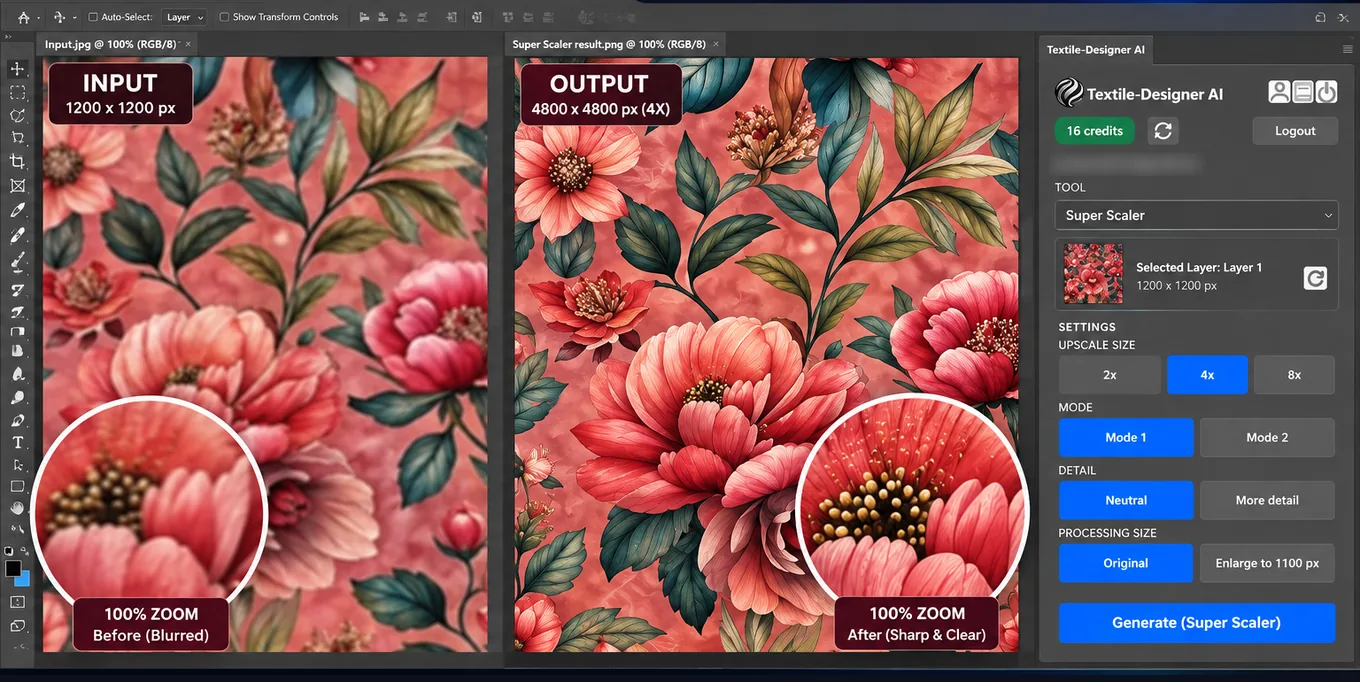
All 25 tools are in the panel. Also included: Ready to Print, Watermark Removal, Repeat Set, Colour Layering, Channeling, Color Transfer, Color Matching, Vectorizer, 3D Effect, Embroidery Effect, Scanned Fabric Texture Removal, Sketch to Design, Foil Separation, Design Creation, Design Generation, Colourways, Spec Board.
Watch a run from start to finish
Real recordings in Photoshop: pick the layer, choose the tool, and the result lands in your document.
Stay in Photoshop from start to finish
The panel uses the same account and organisation credits as the website, so there is no separate plugin balance to top up.
- Works on the layer you have open
- Select a layer, pick a tool and run it. There is nothing to export, upload or download by hand.
- Your original stays as it was
- Every result arrives as a new layer or a new document next to your work.
- You see the cost before you run
- The panel shows how many credits a run needs, and whether your organisation has enough, before you confirm.
- Every run is kept
- Finished runs are saved to your Library on textile-designer.ai, even if you close Photoshop mid-run.
Install
For Photoshop 2023 (version 24.0) or newer, on Windows and macOS.
From Adobe Exchange
Install from Adobe Exchange
Open Textile Designer AI on Adobe Exchange, sign in with your Adobe ID and click Install. You can also find Textile Designer AI in the Creative Cloud desktop app under Stock & Marketplace, then Plugins.
Close and reopen Photoshop
Photoshop only loads new plugins when it starts.
Open the panel
In the Photoshop menu bar, choose Plugins, then Textile Designer AI. It does not open on its own.
Connect your account
Click Connect in the panel, sign in on textile-designer.ai and go back to Photoshop. Credits match your organisation on the website.
Updates arrive automatically through Creative Cloud.
Using Photoshop CC 2019 to 2022?
There is a separate legacy installer for Windows only, for Photoshop CC 2019, 2020, 2021 and 2022. It is not for Photoshop 2023 or newer: on those versions the installer stops and points you to Adobe Exchange. There is no Mac installer for these versions.
We distribute this installer directly. It is not part of the Adobe Exchange listing.
Download and run the setup
Download the installer, then double-click the setup file in your Downloads folder.
If Windows says "Windows protected your PC"
Click More info, then Run anyway. Windows SmartScreen shows this because the installer is not code-signed yet.
Restart Photoshop
Quit Photoshop completely and open it again.
Open the panel
Choose Window, then Extensions, then Textile Designer AI. In Photoshop 2022 the menu is Window, then Extensions (legacy).
Using Photoshop CS6?
There is a CS6 edition for Windows only, for Photoshop CS6 (version 13). It is not a panel: it runs from the File menu, under Scripts, and opens its own window where you connect your account, pick a file, choose a tool and run it. Results come back as a new layer or a new document, and every run is saved to your Library like the other editions. There is no Mac version.
While its window is open, the rest of Photoshop waits. Connect once, process the files you need from inside the window, then close it to carry on. Your sign-in is remembered the next time you open it.
We distribute this edition directly. It is not part of the Adobe Exchange listing.
Version 1.0.3
Run the setup
Double-click the setup file in your Downloads folder and allow it when Windows asks. It copies the script into every Photoshop CS6 it finds on your PC.
If Windows says "Windows protected your PC"
Click More info, then Run anyway. Windows SmartScreen shows this because the installer is not code-signed yet.
Restart Photoshop CS6
Quit Photoshop completely and open it again so it picks up the new script.
Open it from the File menu
Choose File, then Scripts, then Textile Designer AI. If it is not listed, choose File, then Scripts, then Browse, and open Textile Designer AI.jsx from the TextileDesigner folder in your Local AppData.
Connect your account
Click Connect in the window, sign in on textile-designer.ai and go back to Photoshop. Credits and plan access match your organisation on the website.
Questions
Still stuck on an install? See the troubleshooting guide.
Installing
Which Photoshop versions does the plugin work with?
Photoshop 2023 (version 24.0) or newer, on Windows and macOS, installed from Adobe Exchange. For Photoshop CC 2019, 2020, 2021 and 2022 there is a separate legacy installer for Windows only; see "Using Photoshop CC 2019 to 2022?" on this page. For Photoshop CS6 (version 13) there is a CS6 edition, also Windows only, that runs from the File > Scripts menu; see "Using Photoshop CS6?" on this page. To check your version, open About Photoshop from the Help menu on Windows or the Photoshop menu on a Mac.
I clicked Install on Adobe Exchange but nothing seems to have installed.
Make sure the Creative Cloud desktop app is running and signed in with the same Adobe ID you used on Adobe Exchange. Then in the Creative Cloud desktop app go to Stock & Marketplace, then Plugins, then Manage plugins. Textile Designer AI is listed there: click Install if it offers one, otherwise it is already installed and you can go straight to Photoshop.
I double-clicked the .ccx and Creative Cloud did nothing. Is it broken?
No, and the download was fine. Creative Cloud often comes to the front on its home screen without showing an install prompt. In the Creative Cloud desktop app go to Stock & Marketplace, then Plugins, then Manage plugins. Textile Designer AI is listed there: click Install if it offers one, otherwise it is already installed and you can go straight to Photoshop.
It installed, but I cannot find Textile Designer AI in Photoshop.
Photoshop only picks up new plugins when it starts. Quit Photoshop completely and reopen it. In Photoshop 2023 or newer, open the panel from Plugins, then Textile Designer AI. With the legacy installer on Photoshop CC 2019 to 2021 it is under Window, then Extensions; in Photoshop 2022 under Window, then Extensions (legacy). On Photoshop CS6 it is a script, not a panel: choose File, then Scripts, then Textile Designer AI. The panel never opens on its own. If it is still missing, work through the troubleshooting guide.
Does the plugin cost extra?
There is nothing separate to buy. In India the plugin is included with every plan except Basic Monthly. Outside India it is included with Standard Monthly and Unlimited plans. You sign in with the Textile Designer AI account you already have, and runs draw on your organisation credits exactly as they do on the website.
How do I update to a new version?
If you installed from Adobe Exchange, the Creative Cloud app updates the plugin for you. If you installed the .ccx, the legacy Windows installer or the CS6 edition from this page, download the latest file here and run it; it replaces the copy you have. The current version is shown at the top of this page.
How do I remove the plugin?
If you installed from Adobe Exchange or the .ccx: in the Creative Cloud desktop app, open Stock & Marketplace, then Plugins, then Manage plugins, and choose Uninstall next to Textile Designer AI. If you used the legacy Windows installer: quit Photoshop, then delete the folders %APPDATA%\Adobe\CEP\extensions\com.textiledesigner.ai.plugin and %APPDATA%\DesignerAI. If you used the CS6 edition: quit Photoshop, delete the folder %LOCALAPPDATA%\TextileDesigner, and remove Textile Designer AI.jsx and tdhelper.exe from the Presets\Scripts folder inside your Photoshop CS6 folder.
Signing in
How do I connect my account?
Click Connect in the panel. The panel shows you a short code and opens textile-designer.ai in your browser. Sign in there, confirm the code, and go back to Photoshop. The panel picks up the approval on its own, so there is nothing to paste back.
My code stopped working before I could use it.
Codes are valid for 10 minutes. Click Connect again in the panel to get a fresh one.
How long do I stay signed in?
Up to 180 days, then the panel asks you to connect again. Signing out, or signing in on a different computer, ends the session sooner.
Can I use the plugin on two computers?
One at a time per account. Signing in on a second computer signs the first one out, and the panel there will ask you to connect again next time you use it. This is the same rule the website applies to logins.
Running tools
What does the plugin send when I run a tool?
The active layer, so select the layer you want to work on before you run anything. The result comes back as a new layer or a new document, which leaves your original layer untouched.
What file sizes and formats can I send?
Up to 5000 x 5000 pixels and 80 MB per image. The panel sends PNG, JPEG or WebP. A few tools cap lower than that and will say so in the panel before you spend anything.
Do I lose the result if I close Photoshop?
No. Every finished run is saved to your Library on textile-designer.ai, so you can close Photoshop, quit Creative Cloud or lose your internet connection and still download the result from the website. The Library lists your own completed runs.
Can I cancel a run?
Only while it is still queued. Once it starts processing it cannot be stopped. Cancelling a queued run releases the credits that were being held for it.
Credits
How do I know what a run costs before I run it?
The panel shows the credit cost and whether your organisation has enough before you confirm, so nothing is spent by surprise.
Whose credits does the plugin use?
Your organisation shared pool, the same one the website draws on. There is no separate plugin balance to top up.
Do Unlimited plans work in the plugin?
Yes. If your organisation is on a plan where a tool runs free, it runs free in the plugin too, and the panel shows the cost as zero.
Which plans include the plugin?
In India, every plan except Basic Monthly. Outside India, Standard Monthly and every plan marked Unlimited: Unlimited Solo, Studio, Team and Scale, and the credit plans that include the Unlimited core-tools bundle (Premium Monthly, Standard Yearly, Premium Yearly, Teams Standard and Teams Premium). If your organisation is on Basic Monthly, or outside India on another plan, the panel signs you in but asks you to upgrade before it runs a tool; the website keeps working as before.
Start in your next Photoshop session
Included with every plan in India except Basic Monthly, and with Standard Monthly and Unlimited plans elsewhere. Runs use your organisation's credits, the same pool as the website.