How to Search a Textile Design Archive by Image or Text
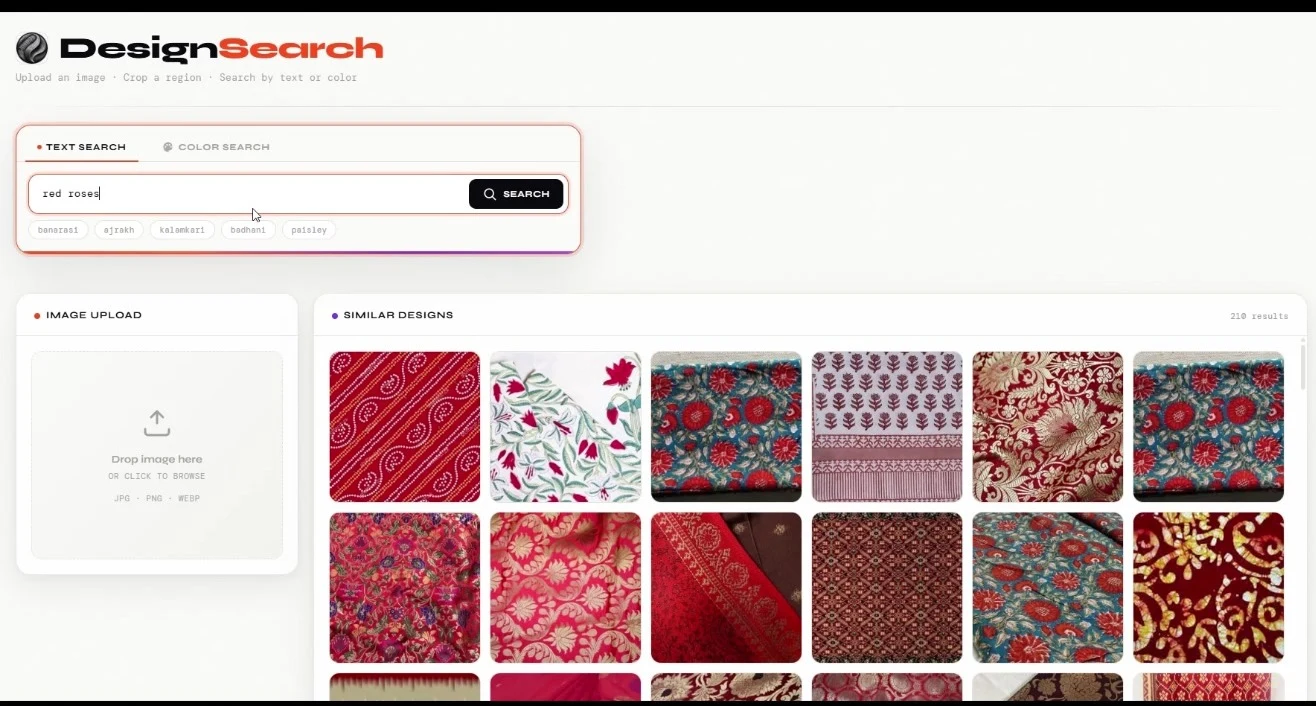
To search a textile design archive, you index the design files where they already sit, then look for them the way you actually think: type "watercolor roses on a dark base" or drop in a reference photo, and image search returns the matching designs with their exact file paths in seconds. No renaming lakhs of files first, no dependence on the one designer who remembers every folder. That is the short answer. The rest of this guide looks at what an unsearchable archive quietly costs a mill every month, why the usual fixes keep failing, and what changes on the shop floor once the archive answers back.
The Problem: You Own Lakhs of Designs You Cannot Find
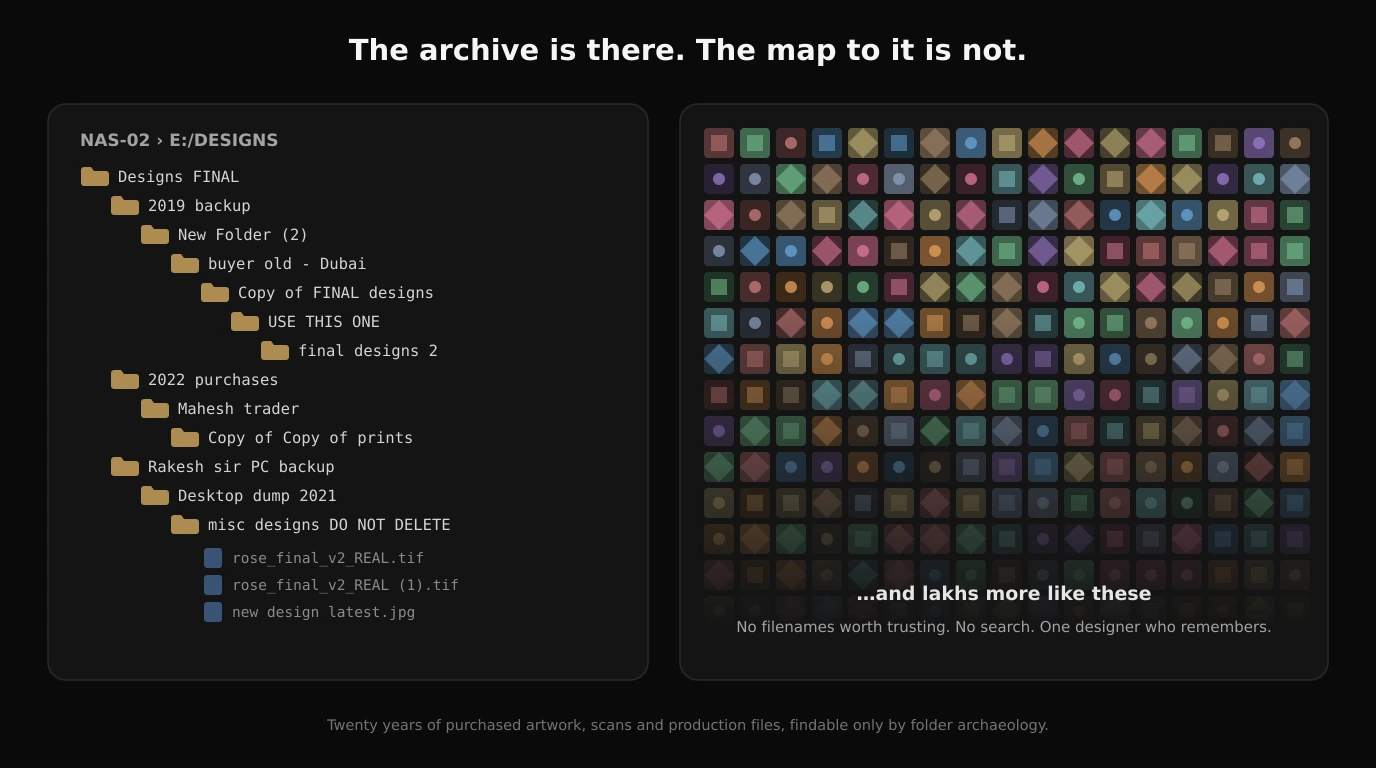
A mid-sized print house in Surat or Ahmedabad typically holds decades of work: purchased designs, in-house artwork, scanned croquis, buyer submissions and old production files, spread across NAS drives, retired desktops, external disks and the occasional DVD spindle. Surat alone turns out roughly 25 to 30 million metres of fabric every day, and every metre of printed fabric started life as a design file somewhere. Multiply that output by twenty years and you get archives measured in lakhs of files. Almost none of it is searchable by what the design actually looks like.
Every owner knows the scene. A trader walks in with a photo on his phone: "you printed this for someone three or four years ago, can you give me a rate today?" The senior designer thinks it looks familiar. Someone opens the NAS and starts walking folders named by month and by buyers who have since closed shop. If the file surfaces, you quote. If it does not, the order walks out the door, or the studio redraws from the photo, or you buy from the trader a design that is very possibly sitting on your own drive.
What the Unsearchable Archive Costs You
Put numbers on that scene and it stops looking like a small annoyance. McKinsey's research on workplace productivity estimated that knowledge workers spend nearly a fifth of their week searching for and gathering information. Design studios sit at the worse end of that average, because a design cannot be found by filename at all. Nobody remembers whether that paisley from 2022 was saved as final_v3.tif or as DSN_8841 inside a folder named after a buyer nobody can place anymore.
Do the arithmetic for your own studio. Three designers, each losing even five hours a week to folder hunting, is over 700 hours a year of salaried time spent not designing. That is before counting the more expensive failures: quotations that went out late because the file could not be found before the trader's deadline, designs redrawn from a photo when the original existed all along, and artwork bought twice because nobody could say with confidence "we already own this one."
Note
And there is revenue hiding in the cycle. Print trends are circular: styles that fade reliably come back into demand, and every veteran trader knows the rhythm; a motif that ran hard four or five seasons ago returns with a new base cloth and a new generation of buyers. When that demand comes back, the mill that can pull last cycle's runners from its archive in seconds quotes the same day and prints from proven artwork. The mill that cannot find them redraws designs it already paid for once, or watches the order go elsewhere. An archive you cannot search does not just waste time; it locks up designs exactly when they become sellable again.
There is one more cost that never shows up in accounts: when a senior designer leaves, the folder map in their head leaves with them. The designs are still on the drive. The knowledge of where anything is, which version was approved, and what was made for whom walks out the gate. Studios that have lived through this describe months of reduced quoting confidence until someone painfully rebuilds the mental map.
Why the Usual Fixes Keep Failing
Most studios attack this problem three ways before giving up, and each fails for a predictable reason.
- Folder discipline. New naming rules work for a month. Then a rush job gets saved to the desktop, a designer copies a folder before editing it, and entropy wins. A system that depends on every designer's daily discipline, forever, is not a system.
- Generic design organizers and asset managers. These are built for marketing teams curating a few thousand brand assets. They assume someone will import, tag and label the collection first. Nobody is tagging lakhs of production files by hand, and untagged files are invisible to them.
- Cloud photo tools and reverse image search. These search the public internet or require uploading your collection to someone else's servers. The archive is the studio's accumulated commercial advantage, and design copying is endemic enough in Indian textiles that legal commentators treat design piracy as a structural industry problem. Uploading the whole collection to become searchable feels like handing over the family gold to get a locker key. So the archive stays offline, and stays unsearchable.
What Changes When the Archive Answers Back
Textile Designer AI Image Search was built around those exact failures, so the fit is one-to-one: each pain above maps to a capability, described here purely by what your team does and what happens next.
- You remember what it looked like, not what it was called. Type it the way you would say it to a colleague: "watercolor roses," "mustard base with small booti," "geometric border, three colors." The results come back in seconds with each design's exact file path, even for files that were never tagged or renamed.
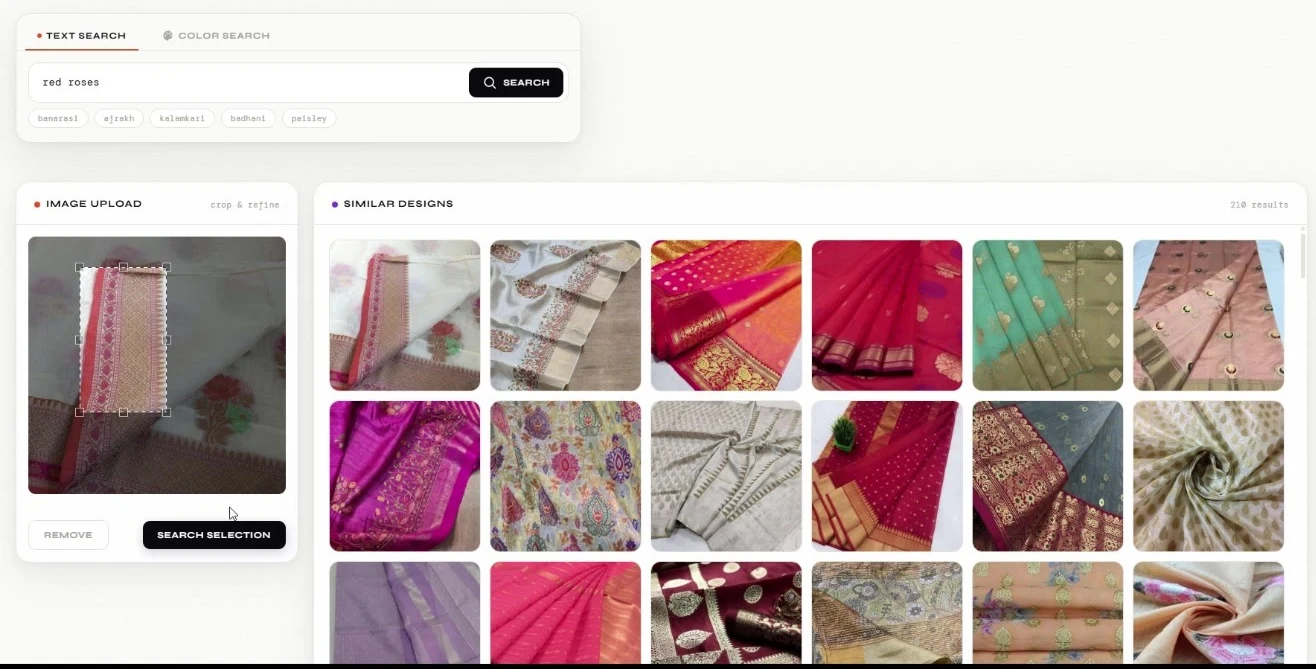
- A trader hands you a photo. Drop the photo into the search bar and see the matching designs and the close variants from your own collection, with their locations. The answer to "do we already own this?" takes less time than making tea for the trader.
- You will not upload your archive, on principle. You do not have to. The indexing app runs against your own storage and the original files never leave your system. What the software keeps is small thumbnails for showing results and a search index, and neither is the artwork nor anything a design could be rebuilt from. Search convenience of the cloud, custody of a locked cupboard.
- You suspect you keep buying designs twice. Duplicate detection flags identical designs sitting in different folders and drives during indexing, and checking a trader's offer against the archive becomes a ten-second search instead of an act of faith.
- Your NAS is always full. The same duplicate detection also pays for itself in storage: it identifies the identical copies scattered across folders and drives and lets you delete the redundant ones to free up space. Years of copy-paste habits hide a surprising share of a NAS in repeat files, and in a factory, storage always runs out right when a new season's files arrive.
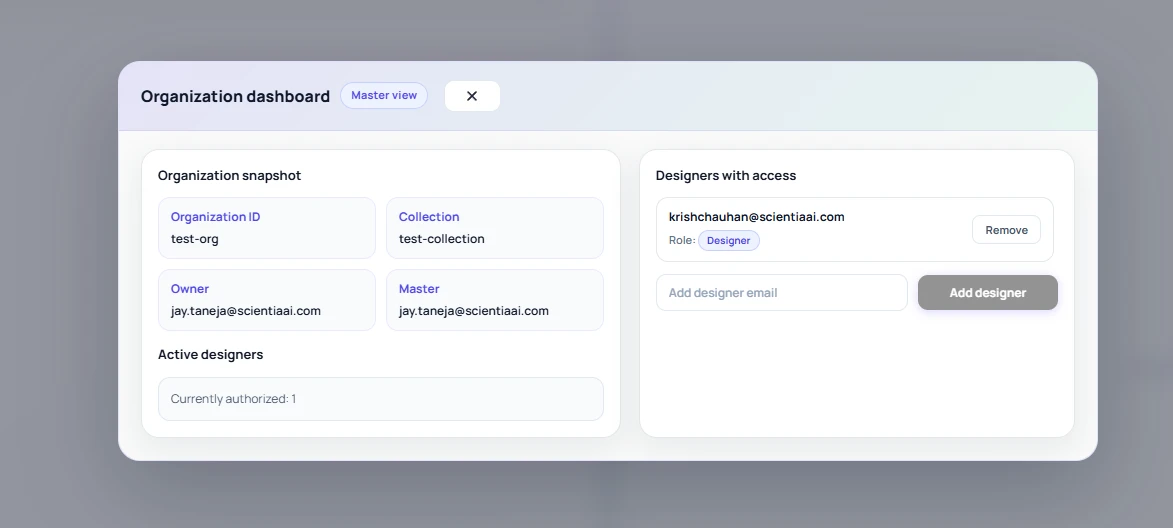
- Ten people need this, with different rights. Master accounts control who can search what, custom tags let the team layer its own vocabulary onto the archive, and the admin dashboard shows usage reports and analytics, so the owner can see the archive actually being used.
Formats cover what a real archive contains: AI, PSD, PDF, JPG, PNG and more, and multi-terabyte collections across several NAS boxes are the normal case, not the exception.
A Worked Example: From Trader Reference to Quote in the Same Morning
Here is how this plays out on a normal Tuesday at a Surat print house. A trader forwards a WhatsApp photo of a running design: a leheriya-style diagonal stripe with a floral buta, photographed off the fabric in bad light. He wants 5,000 metres and he wants to know today whether you can print it.
The old workflow is an archaeology project. The senior designer thinks it looks like something the studio bought around 2022. Two people lose an afternoon walking the NAS, and if the file does not surface, the studio either redraws the design from the photo or buys it again from the trader. Both outcomes cost real money, and both happen every week somewhere in the market.
With an indexed archive, the designer drops the trader's photo into image search. In a few seconds the results come back from the studio's own drives: the exact design, purchased in 2022, plus four close variants the team had forgotten, including a two-color simplified version made for a lower-cost job. Each result shows the local file path, so there is no second hunt to locate the actual file. The designer tags the whole group "leheriya buta" and "trader: Mahesh" so the next search is even faster, and duplicate detection has already flagged that the same design sits in three folders from old copy-paste habits, so the studio knows which copy is canonical.
From there the archive-to-reprint chain is a known road. If the only surviving file is a fabric scan, scanned fabric texture removal cleans the weave out of the artwork, Super Scaler lifts it to print resolution at fabric width, and Repeat Set rebuilds the production repeat. The full restoration path is covered in our guide on going from scanned fabric to production-ready print. The answer to the trader goes out the same morning: yes, we can print it, and here is a strike-off plan.
Folder Browsing vs Generic Organizers vs Textile-Specific Image Search
Most studios that try to fix the archive problem pass through three stages: stricter folder discipline, then a generic organizer or asset manager, then a purpose-built system. Here is how the three actually compare on the questions that matter at a mill.
| Capability | Folder browsing | Generic organizer / DAM | Textile-specific image search |
|---|---|---|---|
| Find a design from a reference photo | Not possible, manual scrolling | Limited or absent visual search | Core feature, returns matches with file paths |
| Search by description | Filename guessing only | Depends on manual tags and metadata | Text search against visual content, no pre-tagging needed |
| Effort before it works | Years of naming discipline from every designer | Weeks of importing, tagging and migration | Index the existing folders as they are |
| Where files live | Your storage | Usually the vendor's cloud library | Your storage; originals never leave your system |
| Duplicate detection across drives | Manual and effectively never done | Sometimes, within the managed library only | Automatic across all indexed locations |
| Team and admin controls | Whoever knows the NAS password | General-purpose sharing models | Master accounts, permissions, usage reports |
Generic organizers are genuinely useful for a single designer curating references, and a full asset manager makes sense for a marketing team managing brand assets. But both assume someone will import and label the collection, and both are built around managed libraries rather than lakhs of production files scattered across old drives. For a broader view of how textile-specific tools differ from general-purpose ones, see our roundup of the best AI textile design tools in 2026.
Where Archive Image Search Falls Short
An honest vendor tells you where the human still earns their seat, so here is that list.
- Similar is not printable. The search finds designs that look alike. It does not know that one is an 8-color rotary separation and another is a flat JPG, or which one matches the buyer's costing. A designer still makes the production call, and checking repeat joins or color counts remains human work.
- Production metadata lives in your team's heads. The search sees the artwork, not the job history. Which colorway was approved, which cylinder set exists, which buyer holds exclusivity: that knowledge only enters the system if your team records it, which is exactly what custom tags are for. Tags need an owner and fifteen disciplined minutes a day.
- Bad scans return bad matches. A crumpled, badly lit fabric photo still finds strong candidates, but a barely legible scan of a 1998 design may rank below cleaner lookalikes. Garbage in still degrades results, even if it no longer guarantees failure.
- Duplicate detection flags identical files, and judgment handles the rest. Automatic detection catches exact copies across folders. The harder question, whether a near-match is a recolor you own or a different design you must still buy, is a call for a senior designer, made much faster because the candidates are now on one screen.
- Indexing takes real time up front. Multi-terabyte archives do not index in an afternoon. Plan the first pass like a small project: decide which folders matter, run the indexer, then let incremental updates handle new work.
None of these erase the core gain. They define it: the machine turns a multi-day hunt into a shortlist in seconds, and your experienced people spend their judgment on the shortlist instead of on folder archaeology. That division of labor mirrors what we found comparing AI and traditional textile design workflows stage by stage.
Frequently Asked Questions
Can I search my own design archive with a reference photo from a trader or buyer?
Yes. That is the core use case. You drop the reference photo into the search bar and the software returns the closest matches from your own indexed collection, each with its exact file path. It works even when the reference is a phone photo of printed fabric rather than a clean design file, because the search looks at what the design looks like, not at file names or exact pixels.
Does image search upload my textile designs to the cloud?
Not with Textile Designer AI Image Search. The indexing app runs against your own storage, and your original design files never leave your system. Only small thumbnails and a search index are kept for showing results, and neither is the artwork itself. That distinction matters because a mill's archive is its commercial edge, and uploading lakhs of original files to a third-party cloud is a risk most owners rightly refuse.
How is this different from Google reverse image search?
Google searches the public internet and shows you where an image appears online. Archive image search looks only inside your private collection and answers a different question: do we already own this design, and where is the file? Google cannot see your NAS drives, and you would not want it to. A textile-specific tool also understands pattern language, so a query like "bandhani dots on maroon" behaves sensibly.
What file formats can be indexed in a textile design archive?
All major design formats are supported, including AI, PSD, PDF, JPG and PNG. That matters in practice because a mill archive is rarely uniform: final print files sit next to layered working files, scanned artwork and photographs of strike-offs. The indexer detects compatible files in the folders you specify and processes them without you renaming or reorganizing anything first.
How does duplicate design detection work across multiple drives and folders?
During indexing, the system compares designs across every location it scans and flags identical files that exist in different folders or on different drives. That surfaces the copies that accumulate over years of designers duplicating folders before editing, and you can delete the redundant copies to free up NAS storage, which is perpetually scarce in a factory. It is also the fastest way to check whether a design a trader is offering you already exists somewhere in your own archive before you pay for it again.
The Bottom Line
A textile design archive that cannot be searched is inventory you paid for but cannot sell from. Fixing it no longer requires reorganizing anything: index once, then find any design by typing what it looks like or by dropping in a reference photo, with your original files never leaving your own storage. The mills that adopt this first get a compounding advantage, because every tag, every found design and every avoided repurchase makes the archive more valuable than it was the day before.
See how it works on your own collection: the Image Search intro page walks through deployment, text and reference-image search, tagging, duplicate detection and the admin dashboard, and you can explore indexing plans from there.