Digital Saree Print Design with AI: Body, Border & Pallu
Digital saree print design is an engineered-layout problem, not a single-image problem: one saree needs a seamless body repeat, a linear border, and a standalone pallu panel that all share the same motif language and palette at full fabric width. This guide walks through a production workflow that uses AI for the element generation, repeat building, border work, and colorways, and keeps the designer in charge of the final layout. It is written for the mills and design studios that print sarees at scale, on the calendar they actually work to.
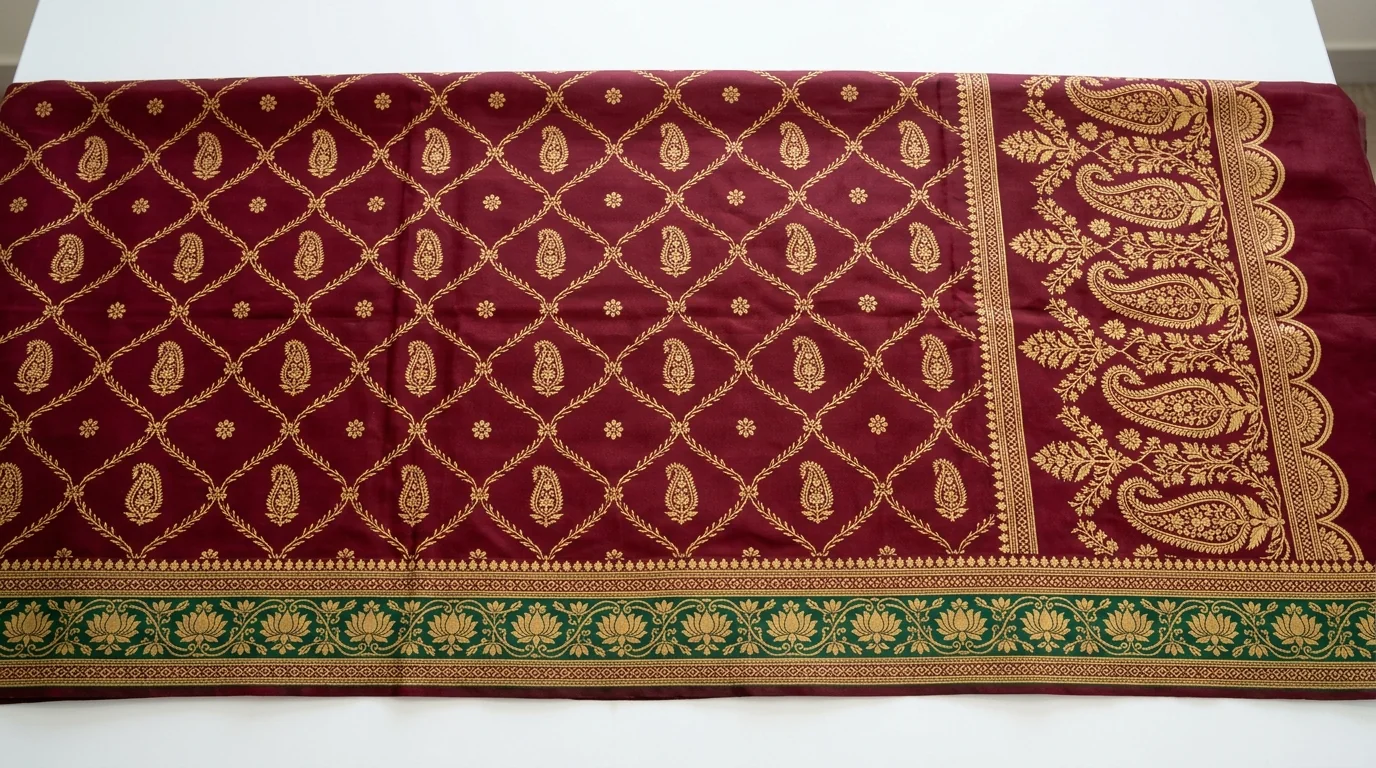
Why the Saree Is the Hardest Layout in Digital Printing
Most textile AI content, ours included, talks about yardage: one seamless repeat tiled endlessly down the roll. A saree breaks that model. It is what print production calls an engineered or placement print, where artwork is positioned deliberately within the final product rather than tiled uniformly. The drape is typically 5.5 metres long, plus roughly 0.8 metres of blouse piece, at a printed width of 44 to 47 inches, and across that length the design changes three times.
The body carries a repeating pattern that must tile invisibly in both directions. The border runs the full length of one or both selvedges and has to turn the corner of the pallu without breaking. The pallu itself, the metre-plus display panel draped over the shoulder, is a one-off composition, usually denser and more dramatic than the body, and it is the part the customer judges first on the shop rack. Get any zone wrong, or let the three drift apart in motif scale or color, and the whole piece reads as cheap no matter how good the printing is.
This is why generic AI image generators disappoint saree designers so consistently. Prompt one for a "saree design" and you get a picture of a saree, not a production file with a tileable body, a continuous border strip, and a pallu panel at fabric dimensions. The useful move is different: use AI for each element and for the mechanical conversions between them, and assemble the engineered layout the way your studio already does.
The Market Moment: Why This Workflow Matters in 2026
The volumes here are not niche. Surat alone produces around 60 million metres of man-made fabric a day, close to 40% of India's total man-made fabric output across roughly 700,000 looms and 400 processing houses, and it is effectively the only polyester saree production centre in the country, according to industry coverage by texfash. The India saree market itself was valued at USD 6.15 billion in 2025 and is projected by IMARC Group to reach USD 10.77 billion by 2034. Meanwhile the digital textile printing market that serves this demand is growing from about USD 4 billion in 2025 toward a projected USD 12 billion by 2036 at a 10.8% CAGR, with Asia-Pacific the fastest-growing region, per MarketsandMarkets.
The calendar adds urgency. Diwali falls on November 8 in 2026, and wholesale festive buying in the Surat markets happens two to three months ahead of it, with printing and finishing consuming weeks before that. Collections being designed in August and September are the festive season. The festive 2026 direction, as we read it, favors digital prints carrying cultural motifs such as paisleys, temple borders, and rangoli-inspired geometry, rich florals in maroon, emerald, ochre, and navy, and a move away from heavy embroidery toward lighter printed fabrics, which shifts even more of the value onto the print design itself.
Tip
Anatomy of a Digital Saree Print Design File
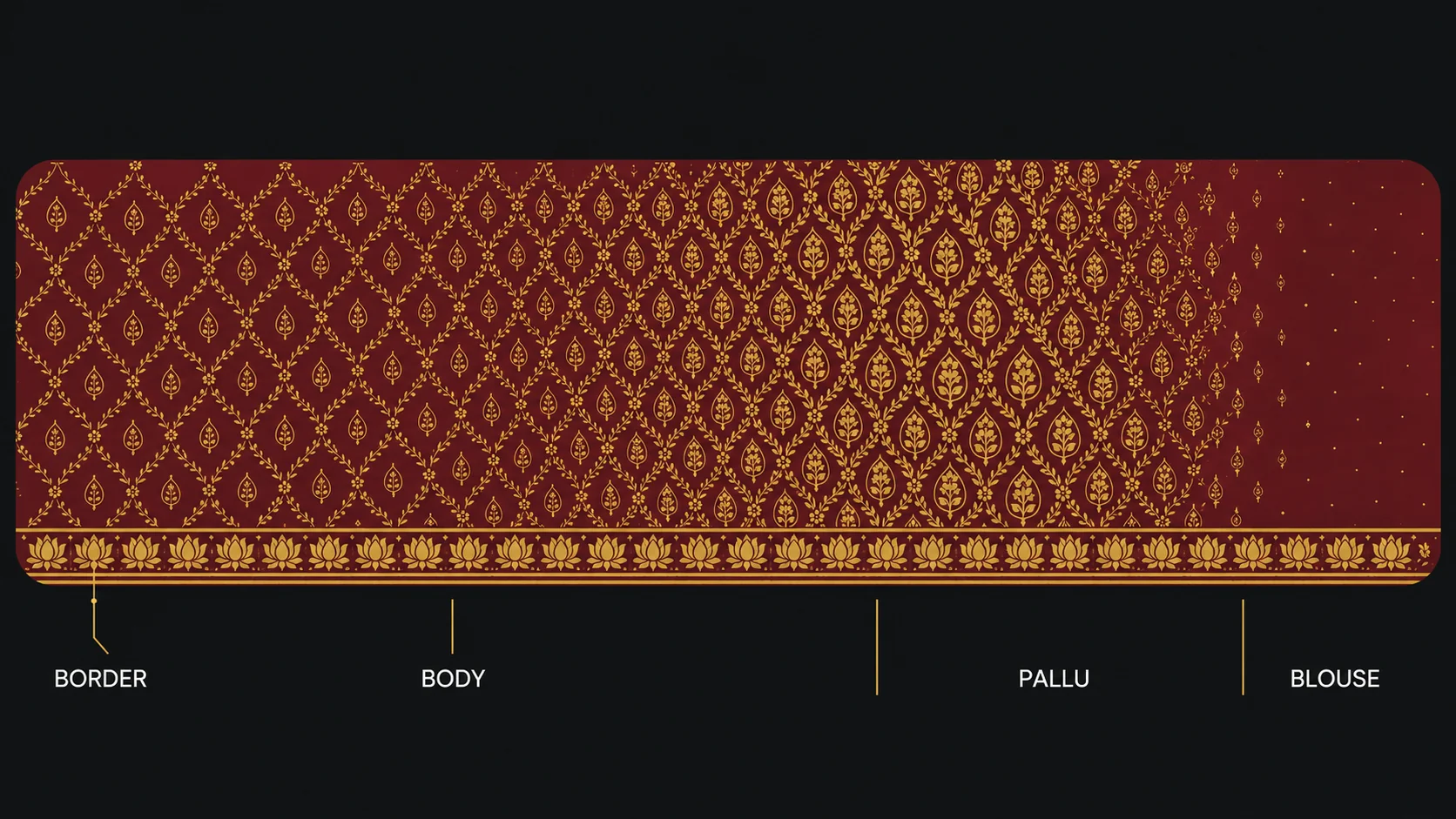
Before the workflow, agree on the zones and their production requirements. These are the numbers a digital saree print design has to hit before any printer will run it.
| Zone | Typical dimensions | Design requirement |
|---|---|---|
| Body | Bulk of the 5.5 m drape, full width | Seamless repeat in both directions, motif scale consistent |
| Border | Full length, commonly 2-10 inches deep | Linear repeat along the selvedge, clean edge, corners resolved at the pallu |
| Pallu | Roughly 1-1.25 m end panel, full width | One-off engineered composition, denser than body, same motif family |
| Blouse piece | About 0.8 m, full width | Coordinating repeat or plain, often a border-derived pattern |
| Full file | ~6.3 m x 44-47 in at 150-300 DPI | Assembled layout, Pantone TCX-referenced palette, separation-ready if not digital |
The AI Workflow: Six Steps from Concept to Print-Ready
Step 1: Generate the Motif Story Once
Everything in a saree hangs together because every zone draws from one motif family. So generate that family first, not three separate designs. Use Design Generation to produce the base design: a paisley and floral jaal for the body, for example, in a festive 2026 palette of maroon and gold or emerald and ochre. If the concept starts as a hand drawing or a buyer's rough reference, Sketch to Design converts it into a clean working base instead of a blank-prompt gamble.
Resist the urge to generate twenty unrelated candidates. Two or three strong motif directions, each pushed through the rest of the workflow, beats a wall of options that share nothing and can never become one garment.
Step 2: Build the Body Repeat
The body is standard yardage logic, and this is where AI does its most mechanical, most valuable work. Repeat Set converts the base design into a seamless repeat; block or half-drop both work for saree bodies. A tiled preview verifies the joins before anything moves downstream. Keep the motif scale honest at real size: a jaal that looks delicate on a monitor can turn into oversized wallpaper across a 44-inch width. If the fundamentals of repeat types are new to anyone on the team, our guide to creating seamless repeat patterns covers block, half-drop, and step repeats in detail.
Step 3: Derive the Border, Not a New Design
Borders fail when they are designed as separate artwork. Derive the border from the body instead: pull the strongest motif elements and run them as a linear composition. Border & Outline generates border strips in the same visual language as the source design, and Motif Arrangement lets you rearrange the extracted elements into the denser, directional rhythm a selvedge border needs. Check the border at its printed depth: a 4-inch border viewed at 100% tells you things a full-layout thumbnail never will. Decide early whether the design is single-border or runs on both selvedges, because that decision changes the body's usable width.
Step 4: Compose the Pallu as an Engineered Panel
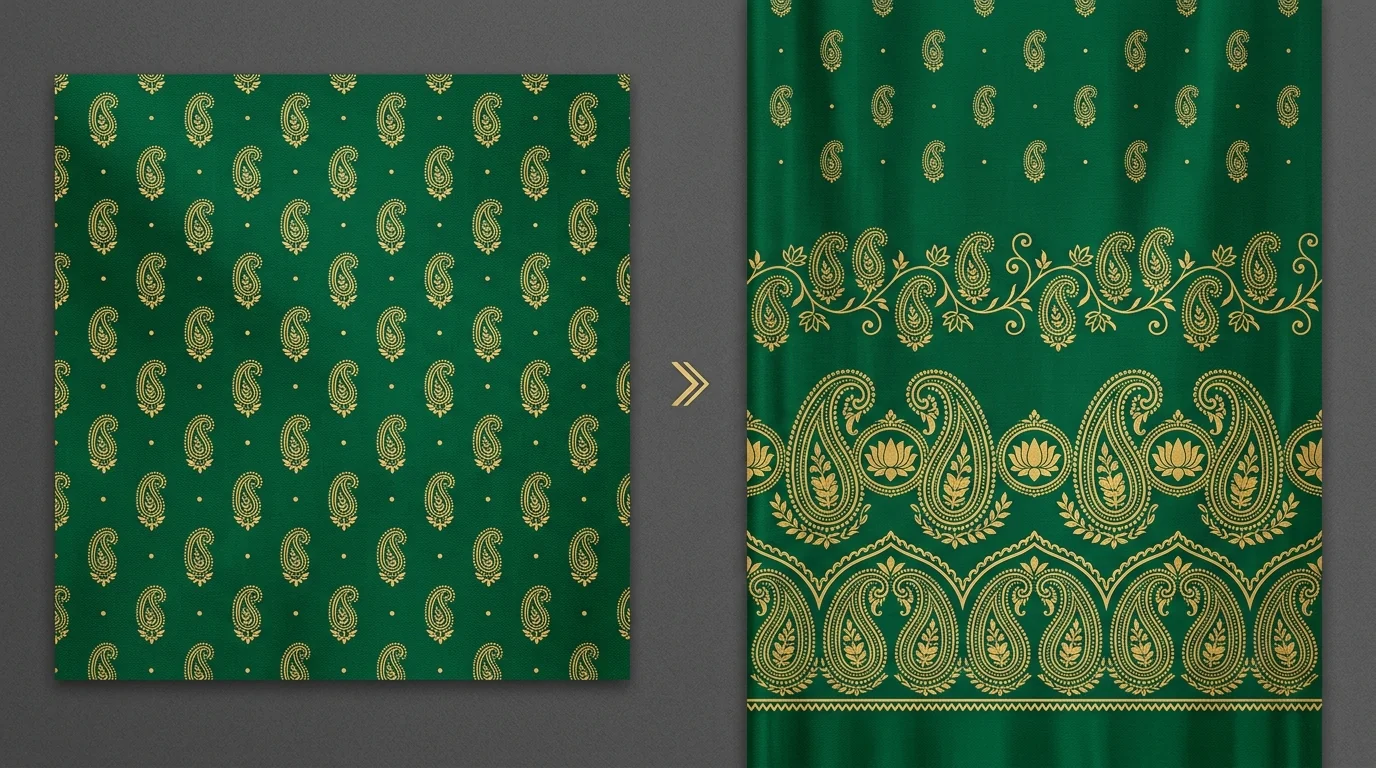
The pallu is the one zone that behaves like placement print work: a fixed-size composition, roughly a metre to a metre and a quarter of full-width fabric, that must peak in density and drama where the drape displays it. Design Extension is the workhorse here: seed it with the body design and extend outward into a larger, denser composition, letting the motifs scale up and concentrate toward the pallu end. Traditional pallu grammar still applies: larger motifs, a build-up of horizontal bands into the main panel, a strong terminal statement at the free edge. AI generates the material; the grammar is a design decision.
Step 5: Lock Color Once, Then Multiply Colorways
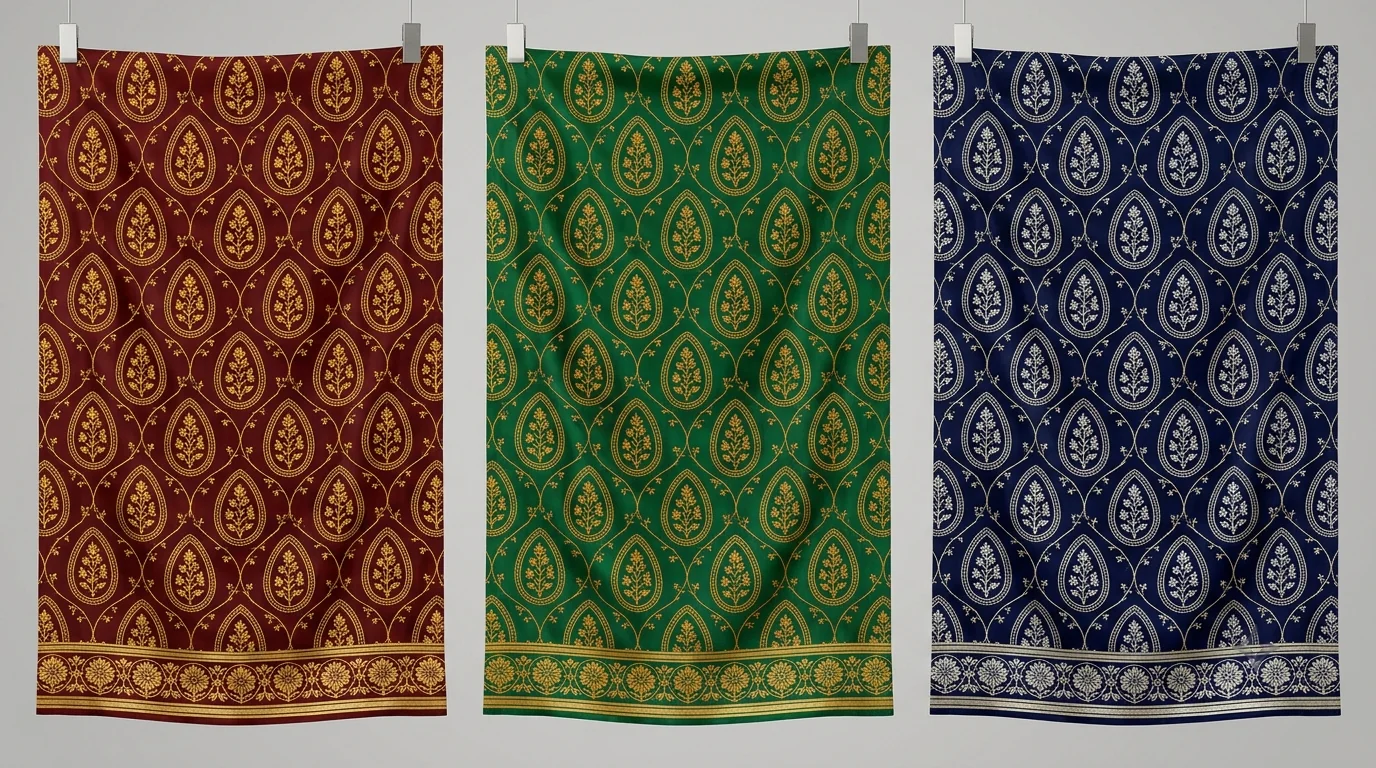
Festive buyers do not take one colorway, and the classic saree-range failure is three zones drifting apart across recolors: the border going warmer than the body, the pallu gold reading greenish. Lock the palette on the assembled element set first. Color Matching maps every shade to its nearest Pantone TCX reference so the conversation with dye houses and buyers happens in TCX numbers, not screen impressions. Then use Color Transfer to push the whole coordinated set (body, border, and pallu together) into each new palette: the maroon-gold lead, an emerald-ochre second, a navy for the modern buyer. The approach mirrors our single-design-to-color-range workflow, applied per zone-set rather than per single file.
Step 6: Assemble, Upscale, and Hand Off
Assembly happens in your layout software: place the body repeat, run the border along the selvedge, position the pallu panel and blouse piece at their real dimensions. Then bring the file back for production finishing. Super Scaler takes elements generated at screen resolution up to printed DPI without smearing motif edges or breaking repeat joins; the difference between textile-aware upscaling and photo upscaling is covered in our print-ready upscaling guide. Ready to Print handles the final production checks. Digital printing takes the assembled file directly; if the design will also run on rotary for a high-volume body-only version, that is when Color Separation enters the picture, and our guide to AI color separation for screen and rotary covers that handoff in depth.
Where AI Falls Short, and the Designer Takes Over
An honest accounting, because saree work punishes overclaiming. First, the engineered layout itself: no AI tool today assembles a full 6.3-metre saree file with correctly positioned zones as reliably as a designer in layout software, which is why this workflow generates elements and leaves assembly human. Second, corners: the junction where a border meets the pallu is a detail buyers notice and AI routinely fudges; plan for manual cleanup there. Third, fabric behavior: how a print reads on flowing georgette versus stiff cotton silk, how disperse inks shift on polyester versus reactive on viscose, is knowledge that lives with your printer and your strike-offs, not in any model. And finally, cultural judgment: motif vocabularies carry meaning, regional expectations differ, and a temple border in the wrong context is a return shipment. AI compresses the mechanical weeks; the taste, the grammar, and the final yes remain the designer's job.
What This Changes for a Festive Production Calendar
The practical effect is not that design becomes instant. It is that the three slowest, most repetitive stretches shrink: repeat correction on the body, border variation rounds, and colorway multiplication each drop from days to hours. A studio that produced one coordinated saree concept in four to six colorways per designer-week can run several concepts through the same window and spend the recovered time where it compounds: pallu composition, corner resolution, and curation. In a market moving the volumes Surat moves, on a festive calendar measured in weeks, that is the difference between showing buyers what everyone has and showing them a range.
Before the Strike-Off: A Five-Point Check
However the elements were made, the same five checks catch most saree print rejections before fabric is wasted. One, view the body repeat tiled at least 4x4 at print scale and walk the tile joins; a join that survives a thumbnail can still ghost at 44 inches. Two, print-preview the border at its true depth against the body, because a border that is 8% too deep quietly eats the body's width and shifts every motif placement after it. Three, zoom the border-to-pallu junction to 100% and resolve the corner by hand; this is the detail wholesale buyers run a thumb over. Four, read the palette in TCX numbers, not on screen: confirm every zone in every colorway references the same TCX set, so the dye house is matching one target, not three. Five, check the pallu's free edge, the last 20 centimetres of the composition, because that is what hangs over the shoulder and what the rack display leads with.
A strike-off still matters after all of this. Digital preview has closed most of the gap, but ink-on-fabric behavior, hand feel, and how the design breaks across pleats are physical questions, and one approved strike-off per concept remains cheaper than one rejected shipment per season.
Frequently Asked Questions
What size should a digital saree print design file be?
Work at the printed width of the fabric, typically 44 to 47 inches, at 150 to 300 DPI depending on your printer. A full saree layout runs 5.5 metres for the drape plus roughly 0.8 metres of blouse piece, so the assembled file is large: design the body repeat, border strip, and pallu panel as separate elements at final size, then assemble them in the layout stage instead of painting one enormous canvas from scratch.
Can AI generate a complete saree design in one go?
Not reliably, and you should not want it to. A saree is an engineered layout with three coordinated zones: a repeating body, a linear border, and a one-off pallu panel. AI is excellent at generating each element and at mechanical work like building the seamless body repeat, extending a pallu composition, and recoloring the full set. The final assembly at saree dimensions is still done in your layout software, where a designer controls exact placements.
How do mills keep the body, border, and pallu of a saree design consistent?
Start every element from the same motif family and the same palette. In an AI workflow that means generating the border and pallu from the body design as the reference, rather than prompting each zone independently, and then applying one Pantone TCX-referenced palette across all three zones so the border does not drift warmer or cooler than the body when printed.
What DPI do I need for digital saree printing on polyester?
Most production houses printing polyester sarees ask for 150 to 300 DPI at final printed size. A body repeat tile that looks sharp on screen at 1024 pixels is nowhere near that once tiled across a 44-inch width, which is why upscaling designed for textiles, one that preserves motif edges and repeat joins, sits at the end of the workflow before separation and export.
When should festive saree collections be designed for Diwali?
Work backwards from the retail calendar. Wholesale buyers in markets like Surat book festive stock two to three months before Diwali, and printing, finishing, and dispatch consume several weeks before that. For Diwali on November 8, 2026, that puts design finalization in August and early September, which is exactly when AI-assisted colorway and repeat work pays off most: it compresses the design iteration weeks when the calendar is tightest.
The Bottom Line
Digital saree print design rewards the studios that treat it as what it is: an engineered three-zone layout with a repeat problem, a linear problem, and a composition problem inside it. Use AI where each problem is mechanical: generation, repeats, border derivation, extension, TCX-referenced colorways, upscaling. Keep the assembly and the judgment with your designers. The festive window is short every year. This is how the same team fits more range into it.
Building a festive saree range this season? Start with one motif and run it through Repeat Set, Border & Outline, and Color Transfer on Textile Designer AI, and see how far one concept goes.